

Back to Basics: The Fundamentals of Online Safety
Course | Introductory | Module | 2
“Caution is the parent of safety.”
~ Proverb
Introduction: Back to Basics
When it comes to our online safety, many of us have received the same basic advice: always check whether a hyperlink is secure; make sure to pick strong passwords; and keep important personal information like your banking details to yourself. Although we hear this kind of advice frequently, we do not necessarily put it into practice every time we go online.
This can become problematic, as we are opening ourselves up to danger from simple online scams that we could otherwise have avoided. As a result, this article will focus on refreshing our knowledge of four of the basic best practices we should follow during our daily online activities. By equipping ourselves with a secure knowledge of these practices, we can lay a solid foundation on which to build an improved, holistic approach to online safety.
1. Double-Check Hyperlinks
When it comes to viewing websites, it is always important to check whether the website URL starts with HTTP or HTTPS. Links that begin with HTPP are more likely to lead to dangerous websites, while those starting with HTTPS have an added layer of protection. You can also use trusted services like Google’s Safe Browsing link checker to find out if a website has already been identified as unsafe.
If you are visiting the website of a well-known brand or business, it is also important that you double-check the hyperlink. When online scammers copy legitimate websites to trick us, they will often use a hyperlink that looks very similar to that used by the real website, but with miss-spelt words, numbers substituted for letters, or additional punctuation like full stops. For example, a legitimate business website may have a hyperlink like https://legitimate.business, while the fake website may have a hyperlink like https://1egitemate.business. Can you spot the difference? The second hyperlink includes a misspelling of ‘legitimate’ as ‘legitemate’, as well as the number 1 substituted for the letter ‘l’ at the start of the word ‘legitimate’. These kinds of changes can be difficult to spot, which is why it is important that we always take the time to think and be critical before clicking on a hyperlink.
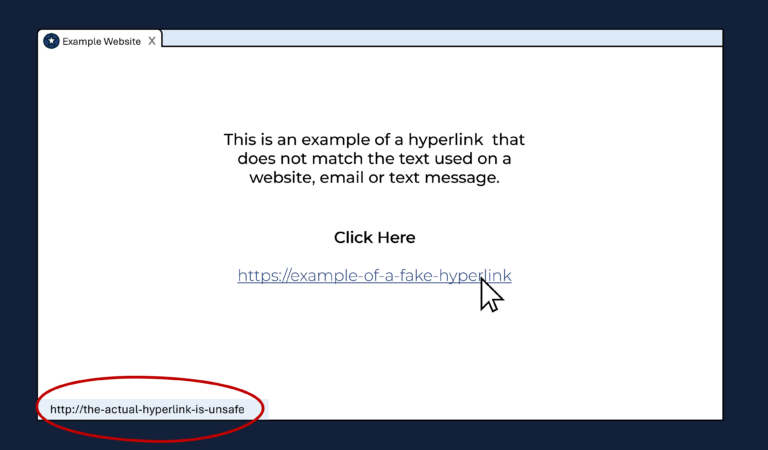
Whether for a website link or one included in an email or text message, you should also check whether the actual hyperlink you will be sent to matches the hyperlink text that you are clicking on. You can do this by hovering over the link without clicking, and checking the hyperlink that is shown in the pop-up box that comes up on your browser or screen. This is important because online scammers may type out a legitimate hyperlink in a message, but the actual hyperlink that the text in their message is linked to leads to an unsafe website. An example of this is shown below.
2. Keep Personal Information & Passwords Private
Another online safety practice that we should always follow is keeping our personal information (such as addresses, banking details or phone numbers) and passwords to ourselves. When sharing information like this becomes necessary for making online purchases, always make sure that you are using a trusted website and accredited online payment service.
Often, when online scams involve fake messages, alerts or phone calls from banks, they will ask us to provide sensitive information like our credit card pins or account passwords. It is important to remember that you will never be required to give this information to a real bank on the phone or via email. If you are uncertain about whether the message, alert or phone call is real, you should first dial the number you have saved for the bank, or access the website and login that you would usually use to check your account (instead of using the hyperlink included in the suspicious message or alert). Ultimately, when in doubt, contact your bank directly for assistance.
3. Manage Network Connections
In order to protect our data and devices, it is always best to avoid using public Wi-Fi hotspots, as these can be easily compromised by hackers.
Sometimes, however, it will still be necessary to use these hotspots. If this is the case for you, then it is best to use a trusted VPN (or virtual private network) provider to help protect your data while using public Wi-Fi.
4. Install Trusted Software Protection Services:
Although many computer operating systems, like Windows, have pre-installed firewalls that help protect our devices and data, it is also important to consider installing a trusted software protection service, such as McAfee, to help improve your cybersecurity.
Conclusion:
Over the course of this article, we have refreshed our knowledge of four basic best practices for our online safety and cybersecurity. These include the acts of double-checking hyperlinks, keeping sensitive personal information private, managing network connections and installing software protection services. In the next article, we will continue looking at online safety through the lens of technology by debunking some of the most common misconceptions we have about online scams.